Hi Ashok
This can be achieved by adding one more automatic activity after CE Review and before CE Evaluation and Compliance Review
If you have any question on the modifications to be done in Workflow please refer my blog page
https://arastutorials.blogspot.com/2021/06/decidevotingpath.html
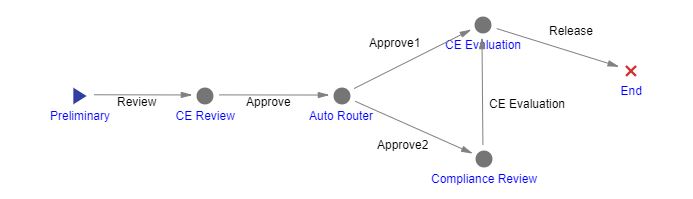
Steps to be followed are :
Step 1: Create below server method (C#) in ARAS Instance
Innovator innovator = this.getInnovator();
string activityId = this.getID();
Item controlledItem = this.apply("Get Controlled Item");
string criticalValue = controlledItem.getProperty("a_criticalvalue");
string pathName = "Approve1";
if (criticalValue == "Yes")
{
pathName = "Approve2";
}
var autoActivity = innovator.newItem("Activity", "edit");
autoActivity.setProperty("is_auto", "1");
autoActivity.setAttribute("id", activityId);
autoActivity.setAttribute("doGetItem", "0");
autoActivity = autoActivity.apply();
if(autoActivity.isError())
{
return innovator.newError(autoActivity.getErrorString());
}
Item fetchPaths = this.newItem("Workflow Process Path", "get");
fetchPaths.setProperty("source_id", activityId);
fetchPaths.setProperty("select", "id");
fetchPaths=fetchPaths.apply();
if(fetchPaths.isError())
{
return(innovator.newError("Could not get Paths for automatic SignOff"));
}
Item path = fetchPaths.getItemsByXPath("//Item[@type='Workflow Process Path'][name='"+pathName+"']").getItemByIndex(0);
path.setProperty("is_default", "1");
path.setAction("edit");
path = path.apply();
if(path.isError())
{
return innovator.newError(autoActivity.getErrorString());
}
return this;
Step 2: Add this method in Pre Activity of Approve Path (Activity Highlighted below)
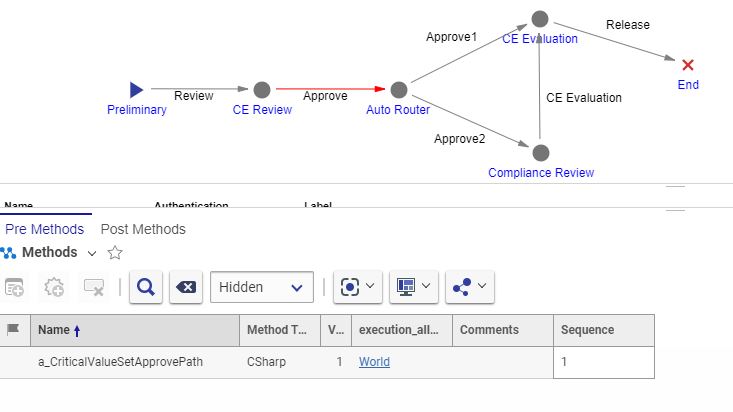
Step 3: (Skip if this method already exist) Create below server method (VB) in ARAS Instance (Method Name should be Get Controlled Item)
' Find the Controlled Item for a Workflow Process or Activity
Dim inn As Innovator = Me.newInnovator()
If Me.getAttribute("type","") = "Method" And Not Me.node.selectSingleNode("Item") Is Nothing Then
Me.node = Me.node.selectSingleNode("Item") 'Handle the case where this method is called from ApplyMethod
End If
Dim qry1 As Item = Me.newItem()
Dim qry2 As Item = Me.newItem()
Dim qry3 As Item = Me.newItem()
Dim wflProcId As String
' Get the Workflow Process
Select Case Me.GetType()
Case "Workflow Process"
wflProcId = Me.getID()
Case "Activity"
Dim activityId As String = Me.getID()
If activityId.Length <> 32 Then
Return inn.newError("Get Controlled Item: Invalid Activity id")
End If
qry1 = Me.newItem("Workflow Process","get")
qry1.setAttribute("select","id")
qry2 = qry1.createRelationship("Workflow Process Activity","get")
qry2.setAttribute("select","id,related_id")
qry3 = qry2.createRelatedItem("Activity","get")
qry3.setAttribute("select","id")
qry3.setID(activityId)
Dim wflProc = qry1.apply()
If wflProc.getItemCount() <> 1 Then
Return inn.newError("Get Controlled Item: Error getting Workflow Process: " & wflProc.getErrorDetail())
End If
wflProcId = wflProc.getID()
Case Else
Return inn.newError("Get Controlled Item: Type must be Workflow Process or Activity")
End Select
If wflProcId.Length <> 32 Then
Return inn.newError("Get Controlled Item: Invalid Workflow Process id")
End If
' Get the Workflow relationship
qry1 = Me.newItem("Workflow","get")
qry1.setAttribute("select","id,related_id,source_id,source_type")
qry2 = qry1.createRelatedItem("Workflow Process","get")
qry2.setAttribute("select","id")
qry2.setID(wflProcId)
Dim wfl As Item = qry1.apply()
If wfl.getItemCount() <> 1 Then
Return inn.newError("Get Controlled Item: Error retriving the Workflow relationship: "&wfl.getErrorDetail())
End If
Dim controlledId As String = wfl.getProperty("source_id","")
If controlledId.Length <> 32 Then
Return inn.newError("Get Controlled Item: Invalid Controlled Item id")
End If
' Get the controlled item
qry3 = Me.newItem()
qry3.setAction("get")
qry3.setAttribute("typeId",wfl.getProperty("source_type",""))
qry3.setID(controlledId)
Dim controlledItem As Item = qry3.apply()
Return controlledItem
Test and let me know if it works
Regards,
Gopikrishnan R