Error on properties event "onEditFinish"
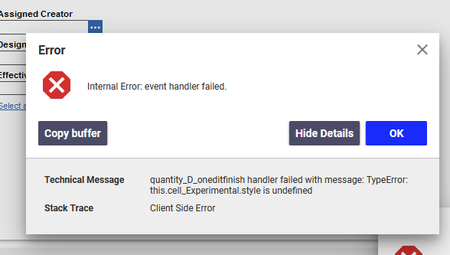

No one [emoticon:ca08b2c27c2f40e993e89508acf29e0b]
Up!

Hi David,
I was able to reproduce this in a local 12.0 SP9 instance. It seems to be due to a change in the way that cells are stored inside the grid object. I've filed an issue internally to have this looked at.
In the meantime, I've found a potential workaround. The actual HTML element of the cell is accessible through the same cell element you get using your code above, so you can simply change the background color yourself using code like the sample below:
//change color bg
var cell = gridApplet.cells(relationshipID,colNumber);
var cellHtmlElem = cell.cellNod_Experimental;
cellHtmlElem.style.backgroundColor = "#123123";
Chris
Christopher Gillis
Aras Labs Software Engineer
Thank you Chris.
So bad I found some core bug
[emoticon:98f842990f454422aa6a04953955f9d9]

The information stored in an event object differs per type of event. The object's type property always holds a string identifying the event (such as "click" or match key presses in a straightforward way, such as input method editor (IME) software When a page finishes loading, the "load" event fires on the window and the