How to trigger or test an activity escalation immediately without waiting
Hi all, I'm testing an activity escalation in a Workflow Map and would like to know how to trigger it right away instead of waiting for the configured escalation time to pass. Could someone share the standard ways to force or test an escalation in a test environment—for example, whether there is a scheduled task/agent or method that can be run on demand, or which date/timeout properties on the workflow activity or assignment determine when it becomes eligible for escalation? Thanks in advance for any help! David3Views0likes0Comments
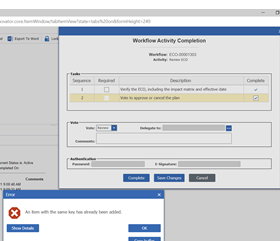
Workflow activity error on voting
Hi, I'm getting this error during a task completition I find in logs the AML that caused error: <AML> <Item type="Activity" action="EvaluateActivity"> <Activity>B500D2569FC54E9AAA7266D3BF9C80E0</Activity> <ActivityAssignment>1D5158BBDA364998B43403E30243E3A7</ActivityAssignment> <Paths> <Path id="1A9BF5EE8BAB4D5885D0680C931ADB81"><![CDATA[Review]]></Path> </Paths> <DelegateTo>0</DelegateTo> <Tasks> <Task id="44FD3E46B1DC4F21B3CCBD517B266970" completed="1"> </Task> <Task id="C6B7EC937DD6470B9D910BDA68D8AE12" completed="1"> </Task> </Tasks> <Variables> </Variables> <Authentication mode=""> </Authentication> <Comments> </Comments> <Complete>1</Complete> </Item> </AML> I try also to apply this AML using nash but error is the same "An item with the same key has already been added" how I can complete the WF activity? Thanks1.7KViews0likes0Comments
How to get previous workflow activity of workflow process path
Hi, Do you know how to get previous (From) workflow activity of workflow process path in ARAS? We added a Post method on workflow process path and tried to access "this". But "this" contains only destination (To) activity ID. However, we are able to get previous (From) state and destination (To) state of a lifecycle transition by accessing "this". Any pointers would be really helpful. Best Regards, Sameer2.8KViews0likes0Comments
Connection of 2 different workflows
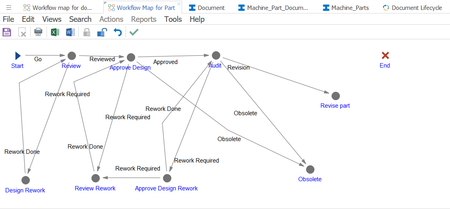
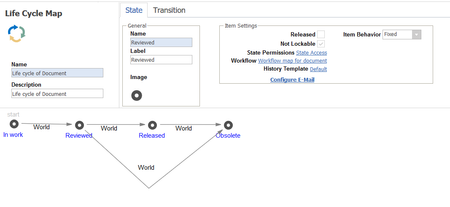
Dear Community, I have a question regarding the connection of 2 different workflows. I built a workflow of 'Parts' and another one for 'Documents'. 'Parts' and 'Documents' are two different ItemTypes and are connectd through a relationship 'One Part can have many Documents'. The Workflow of 'Parts' can be defined as follow: The Workflow of Documents is represented as follow: Now, what I was trying to achieve is that once the activity 'Revision' is carried out in the 'Parts' workflow the 'Document' workflow should be opened and tasks sent to my InBasket. This is because, I want my employees to check if my documents related to a part need to be reviewed and revised once the latter has been revised. I know that I could extend the Parts workflow, however, I want to avoid that. I tried assigning the Document Workflow as a Subflow of the Parts 'Revision' activity and implementing the promotion with the Relationship Parts-Document as the ItemType. I added the Document Lifecycle and Workflow in the Relationship ItemType and in the Document ItemType. However, nothing seemed to work. (PS: the two workflows work fine independently) How should I proceed? I would be very thankful for any help. Best regards, Florian12KViews0likes5CommentsPromotions in Life cycles through workflow maps
Dear community, I am having problems with the promotions of my item type "Documents". Document is an item type which aims at regrouping various documents of our company. A Lifecycle has been created to describe the different states of these documents: As you can see on the picture above, a workflow has been assigned to this lifecycle. Under the "promotions" tab of the workflow I added the transition states relative to the lifecycle: However, once I go to "my InBasket" and complete the task as "Reviewed", the Lifecycle state remains in the "In work" state. How can I manage to get the "Review" state once I reviewed the task? Thanks in advance for your help! Florian7.2KViews0likes2Comments