VaultRecycleBin - What can go wrong if I just delete the complete folder?
Hi Community, I´m currently trying to free up some space on our Vault server. During this process, I noticed that we have accumulated several very large files in the VaultRecycleBin over the years. The files I checked no longer appear to be referenced in the Innovator database. What are the risks of deleting the contents of the VaultRecycleBin? My assumption is that deleting everything would not be a good idea. In a few tests, I found that some files in the folder still seem to have active references. I assume it should be possible to determine which files are still in use and which are no longer needed. But can anyone explain the purpose of the VaultRecycleBin in more detail? Under what circumstances are files moved to this folder? I am not using the Force Orphaned Files Delete variable, so I´m wondering whether these files might be the result of interrupted or failed file transfers, or if there are other scenarios that would cause files to end up there. Any insights or best practices would be greatly appreciated! Angela92Views0likes4Comments
Removing file from vault via server Event
Hai , I do have a requirement to delete unused files from vault , because it consumes memory . So I was trying to deleting files via server event which does not have any relationship . But I was not able to reach vault . Please help me to find a solution in this requirement. Thanks in advance !!105Views0likes2Comments
Call attachPhysicalFile in javascript from an itemtype
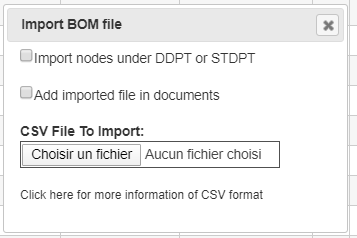
Hi, I have an ItemType "COCO_STUDY" with a relation "COCO_STUDY_FILE" pointing to a "File". On the form of this ItemType, I have a html/javascript widget to import a CSV file. The selection of the file is done with <input type="file">. I would like to implement an option (here: "Add imported file in documents"), to copy the selected and imported document into ARAS (as a File) and pointed by the current "COCO_STUDY" through a "COCO_STUDY_FILE". I understood that I need to use attachPhysicalFile but how ? If I well understood, for security reason, the browser doesn't fullpath of the selected file. So, I don't know how to pass it to attachPhysicalFile. I tried to hardcode the filename for a test but it doesn't work. I did this javascript code if(add_imported_file) { // Add imported file in ARAS let inn = top.aras.newIOMInnovator(); let link_study_file = inn.newItem("COCO_STUDY_FILE", "add"); let fileAras = inn.newItem("File", "add"); fileAras.setProperty("filename",fileInput.files[0].name); fileAras.setProperty("comments", "Imported"); //URL.createObjectURL(fileInput.files[0]) fileAras.attachPhysicalFile("C:\\Users\\to81591\\Documents\\Development\\cawb\\sample_csv_files\\CAD2BOM v0.1_UPDATED.csv") link_study_file.setRelatedItem(fileAras); document.thisItem.addRelationship(link_study_file); } So, in javascript, how to create a "File" from a file selected from an <input type="file"> ? Regards.Solved5.4KViews0likes3CommentsHow can I find orphaned files in the Vault?
Hi, I want to track the amount of Files that are not related to a Document or Change Processes anymore. I noticed that these unrelated files are somehow assigned to the SystemFileContainer Orphaned Files Container . SystemFielContainer is used as PolySource in FileContainerItems. But I have some trouble to find the right query, to detect all of my orphaned Files. Does somebody have an example query for finding orphaned files? Or maybe just some hints, how these different ItemTypes stick together? Thanks and best regards! Angela12KViews0likes9Comments