Can't map query elements in tree grid view
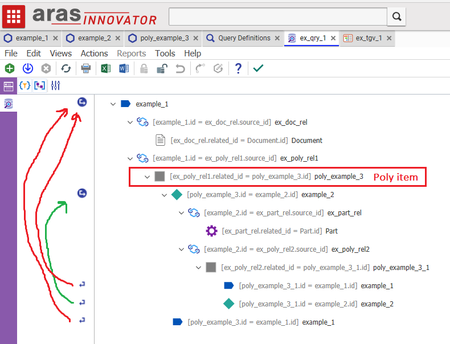
Hi, I have been trying to solve a problem I have with using the tree grid views. I can't seem to map certain elements. I wanted to make a recursive tree grid view based on a relation to a poly item where both poly sources had a relationship to the poly item. I was able to set up a query definition that seems to work fine when i run the test query, but certain elements won't map in the tree grid view. I have tried a few different ways to set up the query and while I've mainly worked in aras 11 sp12, I have also tried it in the open version of aras 12. It seems like the tree grid views have issues mapping element when there are multiple instances of "reuse query definition" in the query. Has anyone encountered or solved this problem? Best Regards Rick Query def: Tree grid view:5.4KViews1like2Comments
How do I set a where statement on a Query Definition against the current date the query is run?
I want to only have it pull a specific relationship (Part AML) if a custom date field "Valid To" is greater than the current date. I am able to create the Where that compares it against a specific date, but this query definition is pulled by another process automatically and I don't want to have to update the Query Definition every day with the current date for whoever ends up running it that day. I currently have: [Valid to] > '2021-11-29T00:00:00' I want something like (this doesn't work) [Valid to] > current_date()3.5KViews0likes5Comments
Query Def & TGV - All Grid Rows Must Have Unique IDs
Good day all. I am getting this error when trying to verify my Query Definition and Tree Grid View are set up. I add a field to a custom ItemType for tracking software, Manufacturer. When I se the query & test it, I can get all of the data I want, so I create the TGV. If I have Manufacturer & Software mapped I can see a row for Manufacturer, but not the Software. If I don't have Manufacturer mapped, I receive the error. I'm not sure what I am missing here. I just did the same thing with another set of ItemTypes. The Manufacturer ItemType has name checked as Unique and identified as the Keyed Name. Software has item_number checked as Unique, with item_number & sw_version identified as Keyed Name. One of the ItemTypes that it works on (the Software side of the query) doesn't have anything checked as Unique. Thanks for any help that you can provide.Solved3.3KViews0likes1CommentAras 12.0 effectivity with OR condition
Hello, I'm using effectivity in tree grid views in Aras 12. One use case I had was to have effectivity on different levels. So that the top level of a structure has certain effectivity configurations and lower levels have their own that refer to the top level. But in order to do this I think I would need to have an OR condition in my effectivity criteria. I have been able to programatically set the "EffectivityCriteriaDefinition" parameter of the query definition to filter by 1 option for a variable by setting the parameter like this: <eq> <variable id="item_id_model" /> <named-constant id="item_id_z5" /> </eq> but when I try to use this type of OR value for the parameter the tree grid fails to render: <or> <eq> <variable id="item_id_model" /> <named-constant id="item_id_z5" /> </eq> <eq> <variable id="item_id_unit" /> <constant type="int">10</constant> </eq> </or> Is this a bug in the tree grid/query definition implementation of effectivity or am I approaching this the wrong way? Best Regards Rick1.8KViews0likes0Comments
Query for Items related to the current user's Identity?
Looking to build a TGV for our users that basically looks for certain ItemTypes that they are either a creator, owner, or manager of. Trouble I'm running into is how to set the initial Query condition? I tried setting a Where condition of Current = Name, but that didn't work. Do get results expected when I set a parameter and then execute the query using Name LIKE $first_name... I will be launching from a method, so I presume that could merge it into the startConditionProviderParam = 'startConditionProvider=ItemDefault({"id":"id"})'; segment, but I was hoping there was a way to do this from the Query itself. Has anyone done something similar?1.2KViews0likes1Comment
Query definition - Same fields added multiple times, causing issues with graph view
Intermittent issue Sometimes, the properties that I add 'disappear' when the query is saved. I've previously made the mistake of going back and adding the properties again. It is not always immediately apparent in the query builder that the properties have been added multiple times. A graph view based on the query does not properly generate. When the properties are correctly displayed for the query definition (sometimes after re-login, sometimes after restarting Chrome browser), I can see that there are duplicate properties. It would be nice if error proofing were built in, so that this situation would not occur. I'd love to hear about any other ways to steer clear of this issue.1KViews0likes0CommentsMAC Policy Issue in ARAS 31 – Need Help with Access Restrictions
Hi all, I’m working on implementing access restrictions for the a Itemtype in ARAS 31. There are around 46 records, and I want to group them into 5 categories. Each category will be assigned to specific identities, allowing controlled access based on the record's classification. To achieve this, I started configuring MAC policies. However, I’ve run into a few issues: The fields I need are disabled in the MAC Policy Condition Editor. User-defined properties are not accessible in the condition editor either. Has anyone faced similar challenges or found a workaround for this? Any help or guidance would be greatly appreciated! Thanks, Salini145Views0likes2Comments
How to use a query to get distinct values from a item table
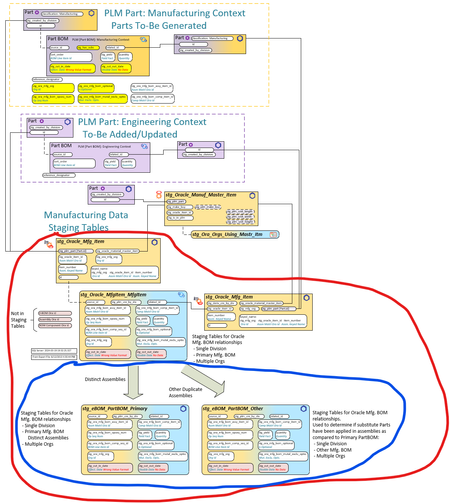
Community, I have created a staging table capability that will be used to generate innovator eBOMs from Oracle manufacturing BOMs. My challenge is working with 1.7 million rows of data in SQL Server. I know I could create a SQL procedure to get the unique (distinct) oracle Assembly IDs but I would like to use a Query Definition. In the data model below, what is circled in RED is the Oracle Data. What is circled in Blue is where I am separating a 1) [multi-Division, multi-Ora Org, with non distinct Assemblies (by Ora Org)] : stg_Oracle_MfgItem_MfgItem INTO 2) [single-Division, multi-Ora Org, Distinct Primary Assemblies] stg_eBOM_PartBOM_Primary AND 3) [single-Division, multi-Ora Org, Other Assemblies (without Primary PartBOM)] stg_eBOM_PartBOM_Other The goal is as follows: 2) stg_eBOM_PartBOM_Primary will be used to generate the innovator [Part BOM] relationships 3) stg_eBOM_PartBOM_Other will be compared to stg_eBOM_PartBOM_Primary to derive Substitutes So I would like to use a Query Definition to gather all the Distinct Oracle Assembly IDs so I can populate the stg_eBOM_PartBOM_Primary table. Thanks in advance for your time and insight. Scott99Views0likes6CommentsTop 1 or Max in Query Builder
It is possible to use a "Max" or "Top 1" function to get the latest/largest value in a field. Whenever I add that function to the where section in Query Builder, it no longer allows me to save. According to the latest documentation for the Query Definition it is possible, but those screenshots are from an older version of Innovator. https://aras.com/wp-content/uploads/2025/06/Aras-Innovator-2025-Release-Query-Builder-Guide.pdf I am attempting to get only the latest CE_ManufacturerPartDetail entry based on the latest Synchronization date. It is not being used in a TGV so I can't limit the execution to one and use sorting to get the latest. I can get past all of the errors with the following but it does not allow it to be saved. The button is greyed out. [Synchronization Date] = max([Synchronization Date]) This is on Aras Innovator version 22. Any help would be appreciated.99Views0likes2Comments