Top 1 or Max in Query Builder
It is possible to use a "Max" or "Top 1" function to get the latest/largest value in a field. Whenever I add that function to the where section in Query Builder, it no longer allows me to save. According to the latest documentation for the Query Definition it is possible, but those screenshots are from an older version of Innovator. https://aras.com/wp-content/uploads/2025/06/Aras-Innovator-2025-Release-Query-Builder-Guide.pdf I am attempting to get only the latest CE_ManufacturerPartDetail entry based on the latest Synchronization date. It is not being used in a TGV so I can't limit the execution to one and use sorting to get the latest. I can get past all of the errors with the following but it does not allow it to be saved. The button is greyed out. [Synchronization Date] = max([Synchronization Date]) This is on Aras Innovator version 22. Any help would be appreciated.147Views0likes2Comments
Really inconvenient misalignment between QD results and IOM standards
(from Aras blog post re: using QD from method....) Parse the Result (of executing a QD from method): When you get the response back from the server, you can parse the results into any format you need. The resulting XML looks a bit like your typical AML data structure. However, it has some important differences to consider: The Item tag uses an "alias" attribute instead of "type". Why? How can this be overridden to comply with the rest of the IOM? The "alias" attribute may or may not match an ItemType name. You can explicitly set the alias in the Query Builder GUI. The Item tag does not include the typical "id", "typeId", or "keyed_name" attributes. Why? How can this be overridden to comply with the rest of the IOM? Item properties contain the id of the referenced item. Related items appear in the "Relationships" tag on the relationship item - not in the "related_item" tag. Why? How can this be overridden to comply with the rest of the IOM?144Views0likes1Comment
How to get the data of Impact Matrix using Query Builder?
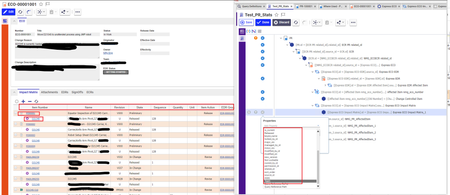
Like the question states. I need to get all the items ( their properties etc) that are associated to a PR(which are ECR, ECO etc.) I also need complete data from the impact matrix of ECO and EDR. When the Impact Matrix relationship is added to the ECO, the Impact Matrix doesn't have the properties such as item_number, Name, Revision etc. These properties are not even close which makes me think I am not going about this the right way. There isn't any other way that I saw to connect the impact matrix to ECO, the only option is via relationship here. Any help is appreciated! Thanks!82Views0likes1Comment
Query Builder show database names instead of labels - how to improve property selection for complex data structures?
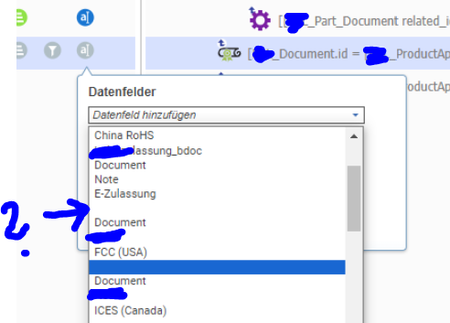
Hi community, does anyone know how to prevent that Aras use labels for the property selector in the QueryBuilder? I try to extend a Query Definition, but I would prefer if Innovator shows the native database name of the properties instead of the label: Note following situation in the image: - Entries are not distinguishable when they have the same label, like "Document" - Entries are sometimes just blanks where I have removed the label on purpose Innovator doesn´t even seem to honor my perfect sort_order of these properties. Does anyone have an idea how to improve the situation? I currently use a pretty old QueryBuilder version. Maybe situation has improved in newer Innovator versions, but I have to work with what I have [emoticon:44a8a53ad3364ea78a16c5a3229f75bb] Thanks and best regards! AngelaSolved185Views0likes2Comments
Can I customize Tree Grid View input XML
Hello, Question about Tree Grid View/method functionality. I'm are creating some kind of tree (for example Part BOM) & data comparison tool. I'm utilizing Query builder and I have 2 different query results in my method at hand. And now we are planning how to visualize the comparison results to the user. One idea was to utilize Tree Grid View which would fit well in our plans in many levels, but is it customizable enough is the big question. Can I somehow feed or get TGV to read my results? Can I somehow use CSS or modify how TGV could show the results (for example I want to use colors to show the differences between structures & data)? Or is it so the TGV always need's direct results from Query Builder? And the XML it's eating cannot be changed - or are they way to modify it? Or are there any other ways to do it? I believe this is not unique problem. I'm using query builder similarly like in: https://community.aras.com/b/english/posts/using-query-definitions-method-code. And I'm utilizing Form Dialogues currently to ask from user what to compare. Cheers, Jukka Lehtinen4KViews0likes4Comments
How do I use "Like" with declared properties in Query Builder?
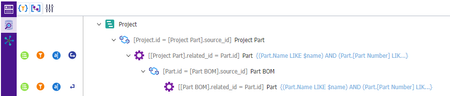
I would like to use Query Builder to get Plant declared Manufacturing Parts who's item numbers have a Root that are Engineering Part number. Example: Engineering Item Number: 1122345 Manufacturing Item Numbers: 1122345 (ABB), 1122345 (GFD), 1122345 (PLO) In SQL I could use 1) Where [Part].item_number like '1122345%' 2) Where [Part].item_number like CONCAT([Part].item_number,'%') and [Part].classification = 'Manufacturing' I tried the following in the following order as Query Definition Conditions: 1) [Part Number] like '@[Part Number]%' -- This did not work. 2) [Part Number] like '1122345%' -- This did not work Can anyone make a suggestion here? Are there any documents that cover/describe examples of Query Builder Condition Statements? Thanks for the help! Scott672Views0likes3CommentsHow do I set a where statement on a Query Definition against the current date the query is run?
I want to only have it pull a specific relationship (Part AML) if a custom date field "Valid To" is greater than the current date. I am able to create the Where that compares it against a specific date, but this query definition is pulled by another process automatically and I don't want to have to update the Query Definition every day with the current date for whoever ends up running it that day. I currently have: [Valid to] > '2021-11-29T00:00:00' I want something like (this doesn't work) [Valid to] > current_date()3.5KViews0likes5Comments
Tree Grid View Filtering
Hello, I've got a multi-level BOM that I'd like users to be able to filter by Name or Part Number. I followed the Query Element Builders Guide and the blog post "Filter a Tree Grid View with Parameters"; however it only works with the parameters at the top level. So if for instance, I've got a part (top level) with a Name of "Part_1" and I use the parameters on the TGV with that, it filters fine. But if I have a sub-part to that, with say a name of "Part_2" and I use the parameters on the TGV to that item, nothing shows up. I'm assuming the problem is in the filter condition... (Name LIKE $name) AND ([Part Number] LIKE $item_number) Can anyone help?Solved1.8KViews0likes4CommentsQuery for Items related to the current user's Identity?
Looking to build a TGV for our users that basically looks for certain ItemTypes that they are either a creator, owner, or manager of. Trouble I'm running into is how to set the initial Query condition? I tried setting a Where condition of Current = Name, but that didn't work. Do get results expected when I set a parameter and then execute the query using Name LIKE $first_name... I will be launching from a method, so I presume that could merge it into the startConditionProviderParam = 'startConditionProvider=ItemDefault({"id":"id"})'; segment, but I was hoping there was a way to do this from the Query itself. Has anyone done something similar?1.3KViews0likes1Comment
Query definition - Same fields added multiple times, causing issues with graph view
Intermittent issue Sometimes, the properties that I add 'disappear' when the query is saved. I've previously made the mistake of going back and adding the properties again. It is not always immediately apparent in the query builder that the properties have been added multiple times. A graph view based on the query does not properly generate. When the properties are correctly displayed for the query definition (sometimes after re-login, sometimes after restarting Chrome browser), I can see that there are duplicate properties. It would be nice if error proofing were built in, so that this situation would not occur. I'd love to hear about any other ways to steer clear of this issue.1.1KViews0likes0Comments