Office Connector - PowerPoint Issues
Hello, I am currently working on setting up a template for ARAS Office Connector for Microsoft PowerPoint. By writing a custom VBA script I am able to get the Custom Properties to display on a slide, but the issue I am having is how to have the field/text update when the Custom Property is changed? Has anyone else created a solution for a PowerPoint template that can solve this or approached this in a different way to solve setting up a PowerPoint template?89Views0likes1Comment"Change" property for Tracking Changes and Comments with Office Connector
In the "Aras Office Connector 31 - User Guide" documentation, section "9.7 Tracking Changes and Comments" mentions: "Aras Office Connector can control whether your documents contain change or comment tracking. This feature, if enabled by your administrator, works automatically and allows you to briefly see the status of changes and comments." I understand that if another user reviews the document and adds a comment or modifies the content, this should be reflected in the Changes property of the document. However, I have not found any additional information in the Aras guides about how to activate this functionality. Could someone clarify what settings or permissions need to be enabled by the admin so that the Changes property of the Documents item type correctly reflects the changes and comments made by other users? Thank you in advance for any further details or shared experience!83Views0likes1Comment
How to set Default value thru office connector
Hi, I have to set default value for some of the properties thru office connector, I tried in "MSO_SaveDocument" this method, but value is not getting set on document. (I don't want to map this property with office connector). itemToSave.setProperty("name","Auto Generated"); itemToSave.setProperty("language","en"); itemToSave = itemToSave.apply(); Is there any other approach. Regards, Maddy.4.2KViews0likes3Comments
Instruction: Hiding the Open in Office Button
Hello everyone, Here is a short instruction on how to hide the Open in Office (Microsoft Office Connector) Button when viewing document items. This can be done without uninstalling / disabling MSO in case you want to prevent users from using the Toolbar Action button. Before: After: This can be achieved by taking these steps: Go to the root \Innovator installation directory of your Innovator instance Navigate to \Innovator\Client\styles Append common.min.css with the following CSS: [data-id="MSO_OpenInOfficeMenuButton"]{display: none!important;} I recommend also updating the regular common.css file with the same CSS but indented Save, clear browser cache and reload the Innovator webpage I hope this helps. All the best from Almelo. Daan1.8KViews0likes3CommentsError while saving Document thru Office Connector
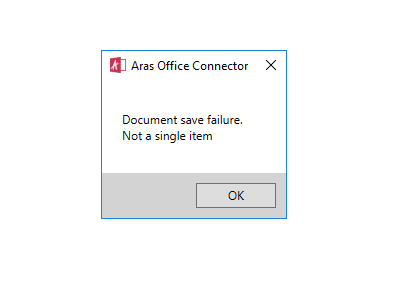
Hi, I'm getting error while saving document thru office connector with normal user, but if I saved Document using root user it is getting saved, I am not able to track from which MSO method I'm getting this error. Please find below Image: Which methods are getting triggered when we save the document thru Office Connector? Regards, Maddy.2.2KViews0likes0Comments