How to fetch file object of vaulted File with JS so we can later read the file content?
Hi community, does anybody a way to read the file content of existing Files in the Vault (mainly xml data) with Javascript? For example we have an CAD item with an xml file in the property native_file. With an button click I want to read the filecontent and stream the result to another system. (I know that the xml files are not the typical content of the CAD ItemType, I just abuse this ItemType for my current test :-) ). I know that we can use fetchFileProperty to download files to the client. In addition there seems to be an additional 3rd parameter where we can define if we really want to download the file (Standard Mode), or only get the File item (Dry Mode). But none of these two modes will return the native FileObject needed for the FileReader. I tried the following code from a regular Form button: var fileObject = document.thisItem.fetchFileProperty("native_file", "C:\\Temp", 1); This variant will return the file item. Is there any way to get the file object itself with JS? Another possible solution would be to use C# for this task. This way we could download the file temporary to the server and then ready the file content there. But maybe it´s possible to avoid this additional download? Thanks for any help!7.5KViews0likes4Comments
Call attachPhysicalFile in javascript from an itemtype
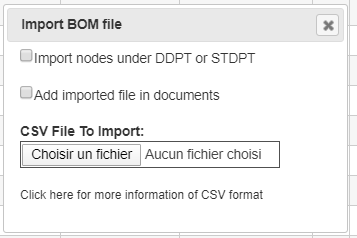
Hi, I have an ItemType "COCO_STUDY" with a relation "COCO_STUDY_FILE" pointing to a "File". On the form of this ItemType, I have a html/javascript widget to import a CSV file. The selection of the file is done with <input type="file">. I would like to implement an option (here: "Add imported file in documents"), to copy the selected and imported document into ARAS (as a File) and pointed by the current "COCO_STUDY" through a "COCO_STUDY_FILE". I understood that I need to use attachPhysicalFile but how ? If I well understood, for security reason, the browser doesn't fullpath of the selected file. So, I don't know how to pass it to attachPhysicalFile. I tried to hardcode the filename for a test but it doesn't work. I did this javascript code if(add_imported_file) { // Add imported file in ARAS let inn = top.aras.newIOMInnovator(); let link_study_file = inn.newItem("COCO_STUDY_FILE", "add"); let fileAras = inn.newItem("File", "add"); fileAras.setProperty("filename",fileInput.files[0].name); fileAras.setProperty("comments", "Imported"); //URL.createObjectURL(fileInput.files[0]) fileAras.attachPhysicalFile("C:\\Users\\to81591\\Documents\\Development\\cawb\\sample_csv_files\\CAD2BOM v0.1_UPDATED.csv") link_study_file.setRelatedItem(fileAras); document.thisItem.addRelationship(link_study_file); } So, in javascript, how to create a "File" from a file selected from an <input type="file"> ? Regards.Solved5.4KViews0likes3Comments
About File Permission
As written in the document “File Handling”, the permissions of a File Item are dependent on the Item containing that File (File container item). But I think there are some use-case for control the file item permission independent of the container item. Ex) CAD Item - Engineer : can upload and download the native files - Sales staff : can download the viewer files (PDF) and are not allowed to download native files - Restricted staff : can view just the data in Visual Collaboration, and are not allowed to download native files and viewer files. I think Aras does not have capability for these use-case with standard permission framework, so I’m considering how to satisfy the requirement. Please give me some advice. Below are my ideas that prevent to download the files by who can access the File Container Item. 1. If the file container item has the file as a property I have two ideas. - Clear the property of managing the file item at ‘On After Get’ event of File Container Item . In search grid and form view, the value of the property for file item is cleared. - Clear the id of the file item at ‘On After Get’ event of File Item . In search grid and form view, the value of the property for File Item is showed normally but cannot download. (show the message “Failed to get the file.”) 2. If the file container item has the file as Relationship Item In this case I have four ideas. - Clear the related id at ‘On After Get’ event of Relation Item In the relation grid, it seems like null relationship, so I cannot download the file. But in Structure Browser, I can see the file item and download the file. So, this idea is not good. - Clear the id of the file item at ‘On After Get’ event of File Item . In the relation grid, it seems like null relationship, so I cannot download the file. (same as above) And in Structure Browser, I can see the file item, but I cannot download the file. - Set the permission of the relation item as “No permission”. In the relation grid, I cannot see the relationship, so I cannot download the file. And in Structure Browser, I cannot see the file item, so I cannot download the file. - Set the permission of the relation item as “Discover only”. In the relation grid, it seems like normally (I can see the file name), but I cannot download the file. And in Structure Browser, I can see the file item, but I cannot download the file. If you have any idea to control the file permission, please let me know.4.6KViews0likes2Comments
Download multiple files on one click
Hello Guys, I am trying to download multiple files from the aras innovator SP11. I have written javascript code. I am fetching all the files from the relationship and trying to download all at a time. Below is my code - for(var i=0; i<array.length; i++){ var myFile = aras.getItemById("File", array, 0); aras.downloadFile(myFile,aras.getItemProperty(myFile, "filename")); } By using this code it is downloading only one file. I have added loop and trying to download the all files. Any one have idea on it? What is the issue?3.9KViews0likes2CommentsGet a direct link to a file
Hello, Is there a way to get a direct permanent link to a file content? I found a link like /InnovatorServer/Client/?StartItem=File%3A{fileId}, but if I click on this link, the file is downloaded in the new popup window. Popup window downloads file using link /InnovatorServer/vault/vaultserver.aspx?dbName={dbName}&fileId={fileId}&fileName={filename}&vaultId={vauldId}&token={token}. This is a direct link, but not permanent. I need a link that I can open in the browser and if I have opened a session, the file will be downloaded.3.7KViews0likes2Comments
Federating Files in ARAS
Hello, I am currently looking into federating some data coming from another system in ARAS. The objects themselves are already being displayed correctly but now I'm looking into being able to display the main file for each of there objects in ARAS. I wanted to ask if there is a way to "federate" the files while still being able to use the native ARAS file item fields, etc... The amount of files is quite high so if possible I would like to avoid creating File Items for all of them... Thank you, Bernardo2.5KViews1like1Comment
Prevent Popup on download of File
Hi community, Currently, when downloading a file from an innovator installation, like the viewable file property on CAD, a popup window occurs and the file is downloaded in chrome. Is there a way to get the file to download in the original window?919Views0likes2Comments