Combine and selectively export PDFs in Innovator
Hello! I'm looking for something to add into Innovator that would allow my users to take multiple documents with attached PDFs and be able to selectively output them as a single PDF. For example, I could have 3 3-page PDFs. I want page 1 from PDF 1, page 2 from PDF 2, and page 3 from PDF 3 but not their other pages to be exported a single, new PDF (only 3 pages, not 9). Are there any tools or converters you're aware of which are compatible with Innovator? Preferably something that can be embedded into the Aras installation as our clients use secured, on-prem versions and thus can't make calls out to other websites. Thanks in advance for your help.116Views0likes4CommentsTDF - Change an Element to Different Schema Type (Text > Heading)
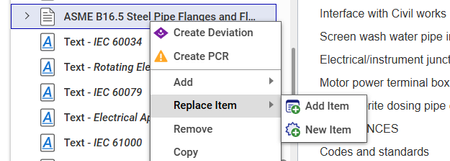
Hello All, Has anyone come up with an easy way to convert one DocumentSchemaElement into another one? We are dealing with importing Word documents into Tech Docs and rather than trying to hard-code in all the possible different style scenarios we're looking at some sort of CUI element to click a document node and then convert it to something else. Examples: Text to a Chapter or Section Text to a List Item There's a 'Replace Item' OOTB action, but I'm just curious if anyone has looked at swapping an element type. Example from OOTB below. Thanks in advance!30Views0likes0CommentsTDF / Tech Docs: DocumentSchemaElement for Section from Content Generator?
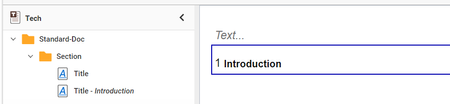
I've already looked at this Labs project: GitHub - ArasLabs/content-generator-samples: This project contains code snippets to demonstrate how to create and manipulate content in Aras Technical Documents. and also in the documentation, but can't see the proper commands for Section or Chapter. Basically I'm looking for the proper content generator code to: - Create a section or chapter with the title pre-filled out (such as "Introduction") - Create a sub-section or sub-chapter below the above (after the pre-filled out content). This: DocumentSchemaElement sectionElement = (DocumentSchemaElement) this.Factory.NewElement("Section") ; sectionElement.AddChild(this.Factory.NewText("Title","Introduction")); targetElement.AddChild(sectionElement); Sort of works. It creates a section, but it doesn't fill out the Title of the section, it fills it as a child. Does anyone have any guidance on this? Thanks in advance!!428Views0likes3Comments
TechDocs Content Generator - how to add TOC-Section content automatically?
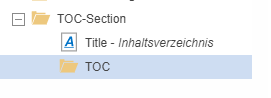
Hi community, I want to use a TechDoc Content Generator Method so I can automatically fill the TOC-Section title according to the target language (de/en). In addition I also want to add the element 'TOC' automatically. As soon as users add a new TOC-Section, they shall get the following view. Unfortunately I right now struggle with both the multilingual title and the 'TOC' element.. My idea was to use something like this: //MethodTemplateName=CSharp:Aras.TDF.ContentGenerator(Strict); if (/* document language is German */) { // Add German title targetElement.AddChild(this.Factory.NewText("Title", "Inhaltsverzeichnis")); } else if (/* document language is English */) { // Add English title targetElement.AddChild(this.Factory.NewText("Title", "Table Of Contents")); } // Add TOC element targetElement.AddChild(this.Factory.New????("TOC")); // what do I have to use here? Would be cool if someone know how to use the ContentGenerator for this purpose. This way all kind of default elements could be automatically filled with default values. Thanks for any hints! Angela5.2KViews0likes3Comments