Release 36 Bug Fix: Search Grids Remain Blank and Strange Horizontal Scroll Behaviour
Hello Innovators, In Release 36 we were facing some strange behaviour: Some grids remaining blank even though items where returned from the search query Horizontal scrolling on grids would result in columns being mixed and glitching After some debugging, we found the issue was caused by 3 files. Attached you find those fixed files and a readme.txt on how to implement them. [View:/community/cfs-file/__key/communityserver-discussions-components-files/10/R36-Blank-Search-Grid-_2B00_-Horziontal-Scroll-Bug-Fix.zip:320:240] I hope this can help anyone else facing this issue. All the best, Daan340Views2likes7Comments
Targeting Element on Form from Relationship Grid
Hello All, I'm making a relationship grid event that fires on a row selection. It's meant to target an HTML control on the top item form and then will fill it with a TGV. Trouble is, I'm running in circles trying to target the element on the form, which is called 'tgv'. Lots of debugger tries in the console and methods and nothing is finding it. Have tried... top.mainWindow.document.getElementsByName("tgv")[0]; top.mainWindow.document.querySelector('div[name="tgv"]'); parent.document...... Any thoughts or help?143Views0likes7Comments
How to add columns to My InBasket records
I am looking at this pdf and wondering if this is the only way to add columns in the InBasket search grid for the end user. Aras Innovator 27 - Configurable InBasket.pdf the data is on Aras's cloud, we are not on-prem. As per these instructions I have to drop, recreated and rename views and tables. As per these instructions you are suppose to check if the views were dropped. I cannot confirm that because we don't have access to our data. These instructions are super finicky. The queries provided in this document sometime run from Aras portal and sometimes not. I have been running the queries directly in SSMS and still facing errors. Is there literally no other way of adding columns to InBasket. I just want the "Title" in there47Views0likes0CommentsHow to change the position of a Relationship Accordion tab
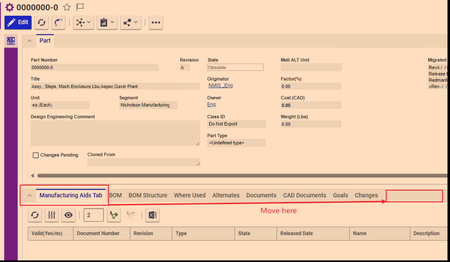
I needed to make a tab visible to certain identity. Therefore, I selected "Hide All" in the relationship types and used the CUI control to make a new tab. I need this tab to be all the way to right. Sort Order fields don't work, neither in the Relationship Type nor in cui_windowSection. Pictures below147Views0likes3Comments
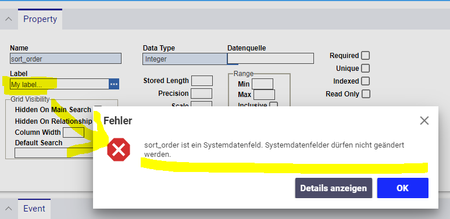
sort_order is a system data field. System data fields must not be changed
Hi community, I try to change the label of the sort_order property in one of my relationship ItemTypes. I have done this kind of change in many ItemTypes before and it always worked as expected. Typically I replace the sort_order label with something more readable for the user. But in my current sort_order property, I literally can change nothing, not even the label. I always get the following error message: sort_order is a system data field. System data fields must not be changed I even get the error message if I don´t change anything and just click "save". In every other ItemType, changing the sort_order property works without trouble. But my current ItemTypes just won´t let me do it. What can be the reason for this behavior? How does Innovator decide if a property is a system property? On SQL the shown "sort_order" looks like all the other "sort_order" properties in the database. I don´t see anything difference to all the other sort_order entries. It really would be a big help if someone has an idea what can cause this behavior! Many thanks in advance! Angela62Views0likes1Comment
Filter Search Grid based on Addition CUI Parameter
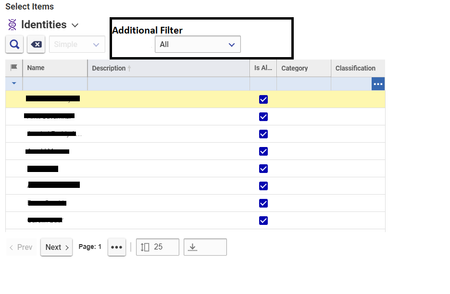
Hi All I have a Search Dialog opening on an Item Property (e.g Identity) As shown in the below Image I wish to further filter the results based on an Addition Parameter provided by the User via CUI Drop down box, I am trying to figure out a way to repopulate the Search Dialog on Change of the Additional Filter Criteria. P.S. The Additional Filter Property may be a relationship attribute based on which the user wants to filter the Parent Items.1.9KViews0likes1Comment
Configurable Grid How to open de requested item ?
I developed a simple configurable grid that retrieves the ID of an item, but I can´t find the way to implement a method to open the item requested when you click on it, or similar. Right click trigger the OnMenuInit event, but the context item is empty or don´t support common functions2.4KViews0likes2Comments