How to control BOM download permissions

オフライン

Hi Community,

We would like to control BOM download permissions. There is a function in Aras to export BOM to Excel or Word as showned in the below screenshot. Can we control this permission so that only permited person can use this menu? Do we need change program codes? If yes, which method should be used to realize this control? 
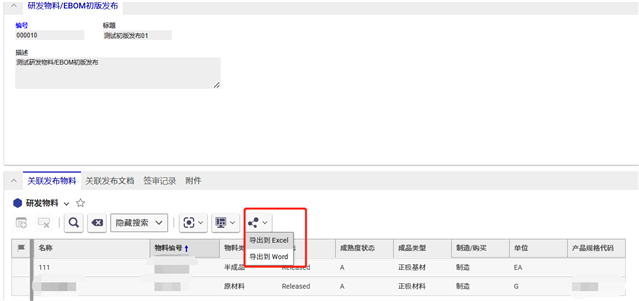
Many thanks in advance.

Best regards,

Miranda

Parents
    1. Create Identity group whose members are NOT allowed to use this menu and fill it membership.
    2. Edit your relationship ItemType and open it's presentation configuration on the Client Style tab.
    3. Create and add new CommandBarSection
    4. Set Classification to "Data Model", Location - to the "ItemView.RelationshipsCommandBar" and For Identity - to "World".
    5. Save the Presentation Configuration.
    6. Open your new CommandBarSection
    7. Pick and add Menu CommandBarItem named "commonitems.commandbar.sharemenu".
    8. Set the "Action" to "Remove" and the "For Identity" to your identity group created on the first step.
Reply
    1. Create Identity group whose members are NOT allowed to use this menu and fill it membership.
    2. Edit your relationship ItemType and open it's presentation configuration on the Client Style tab.
    3. Create and add new CommandBarSection
    4. Set Classification to "Data Model", Location - to the "ItemView.RelationshipsCommandBar" and For Identity - to "World".
    5. Save the Presentation Configuration.
    6. Open your new CommandBarSection
    7. Pick and add Menu CommandBarItem named "commonitems.commandbar.sharemenu".
    8. Set the "Action" to "Remove" and the "For Identity" to your identity group created on the first step.
Children
No Data